
After you pay: the clock, the two stops, and what can change
Between paying and Stored in warehouse there are five published windows, two statuses that stop the clock until you act, and a short list of things that can change. All of it is written down by the operator; this page puts it in order.
The clock
Five windows, as published
Add them up and a captured in-stock find takes about eight to fourteen days from payment to a shelf in Guangdong, if nothing stops the clock. Pre-sale and customised items replace the third window with the seller's own notice; the Expert Sourcing door adds a conversation in front.
- 6 hOrder reviewSubmitted 09:00 to 18:00 Beijing time: processed within 6 hours; submitted overnight: by 14:00 the next day
- 24 hPurchaseThe buyer orders from the seller within 24 hours of your confirmation or top-up payment
- 3 to 7 dSeller shipsDomestic sellers usually ship in 3 to 7 days; customised and pre-sale items follow the seller's own notice
- 3 to 5 dTransitFrom the seller to the Guangdong warehouse under normal conditions; remote origins, holidays and peaks stretch it
- 24 hInspectionSigned for before 17:00: inspected and stored within 24 hours; after 17:00: the 24 hours start at 09:00 the next day
Windows as published: help centre 162, 1441, 82, 83, read 2026-10-10
Stops
The two stops: Pending confirmation and additional payment
Two statuses pause everything until you act, and the operator says so plainly: an unconfirmed order cannot be submitted for shipping.
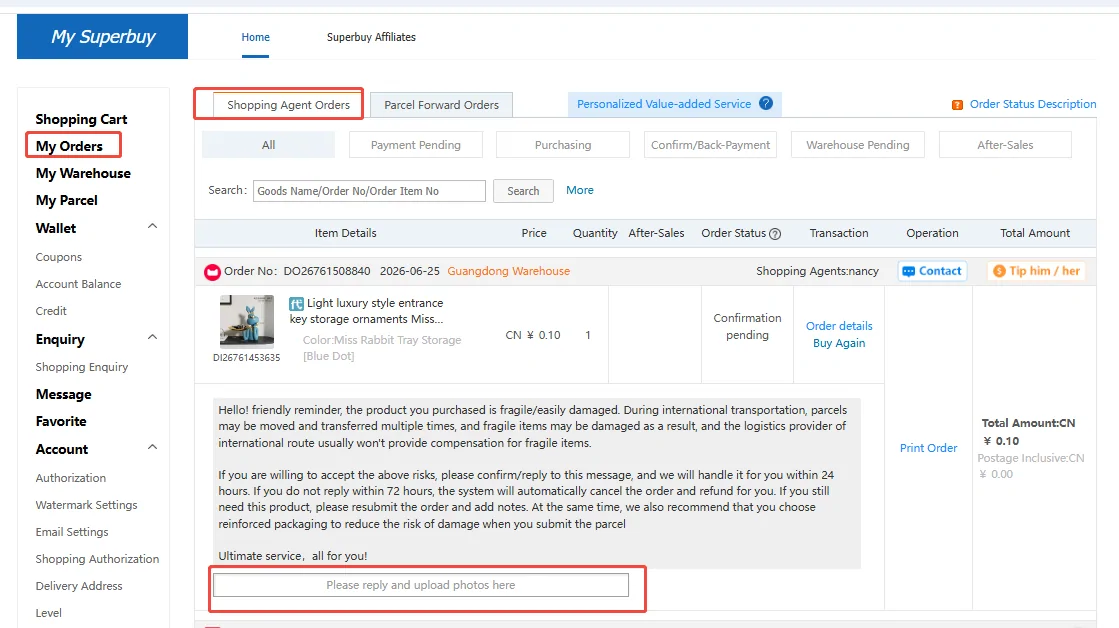
The screenshot is the first kind: a Pending confirmation under Processing, before the item is bought, with the buyer's message and a Confirm button. Reply from Action Needed; a reply by email does not move the order. Most of these messages ask about something the notes box could have settled before the purchase was made.
Both stops can be shortened, for a price. Speedy Response (CN¥5 per order) makes the buyer act within one hour of payment during Beijing working hours, including setting up any additional payment, useful for flash sales and limited drops. Small Amount Advance Payments lets the buyer prepay a difference of up to CN¥50 per order, three open at a time, and take it from your balance later, so a CN¥8 shipping difference does not cost a day. help centre 1444, 3476, read 2026-10-10
Advance
Setting the advance once, for every order
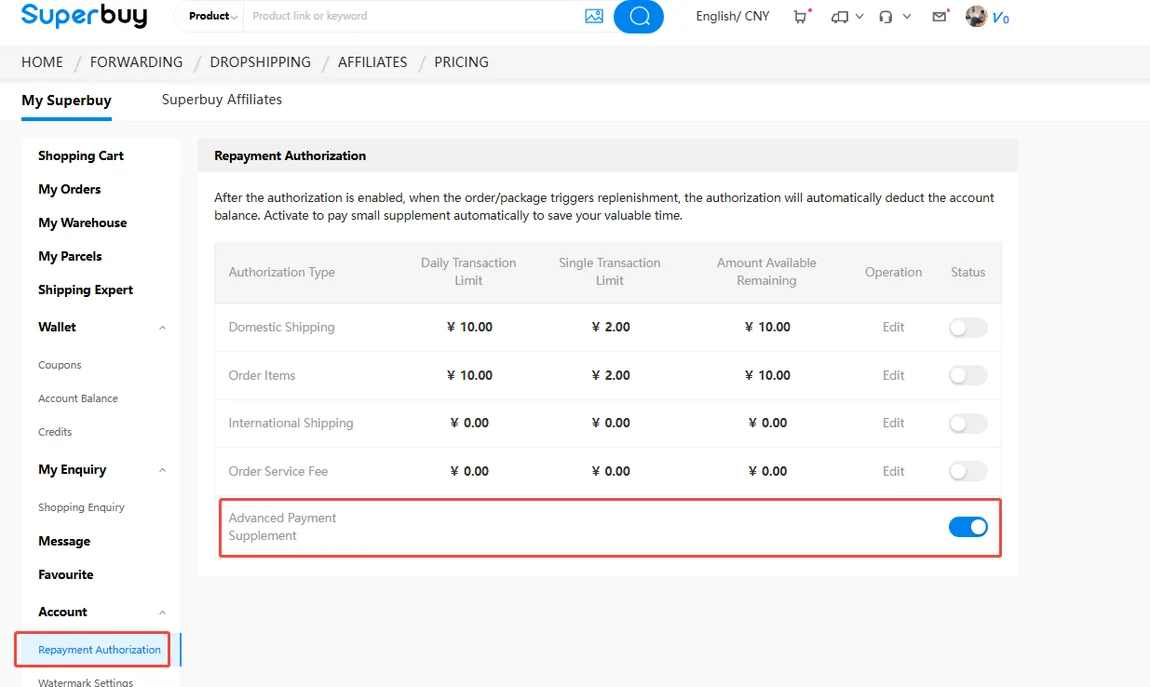
The advance payment option is a box you tick when you submit an order; once ticked it stays on for every later order until you untick it. Repayment is manual from Action Needed, or automatic if you switch on Advanced Payment Supplement under Prepayment Authorization, the screen in the picture, where the limits per transaction and per day are shown by type. If three advances are outstanding, new ones pause until you repay. The service has been running as a trial since 19 June 2025. help centre 3476, read 2026-10-10
Statuses
The purchasing statuses, in the order they happen
Every status word you will see on a purchasing order, with the operator's meaning in a line. The parcel statuses that follow Stored in warehouse are a second list on the operator's page and belong to the shipping stage. help centre 21, read 2026-10-10
Payment PendingOrder generated; pay within 72 hoursUnprocessedPaid, not yet picked up by a buyerOrder PendingWaiting for the buyer to verifyOrder ProcessingAssigned to a buyer, ready to order from the sellerConfirmation pendingThe buyer needs something from youClear BalanceThe real cost exceeded what you paid; pay the differencePurchasedBought; waiting for the seller to send itShipped (Local)On its way to the warehouseDeliveredArrived; waiting for inspectionStock arrivedInspected and weighed; being shelvedStored in warehouseYours to ship any time inside the free storage periodSeparated to shipThe seller is sending the items in more than one parcelInvalidPrice and name did not match, the listing had no pictures, or the item is virtual or prohibitedOrder withdrawnCancelled; refund sent to your balanceRefunding / Returning / Returned / ExchangingThe after-sales states, in the order they happen
Changes
What happens when the find changes after you paid
Out of stock after payment. Sellers do not always update inventory; the buyer asks before paying the seller, and the seller's answer is final. The order is withdrawn and the money returns to your balance, at the rate you paid. help centre 14, read 2026-10-10
You want a different size or colour. Before the seller ships, the buyer asks the seller and tells you. After the seller ships, wait until the item is stored, then request an exchange from the order and specify what you want; with no quality issue, the shipping both ways is yours. help centre 42, read 2026-10-10
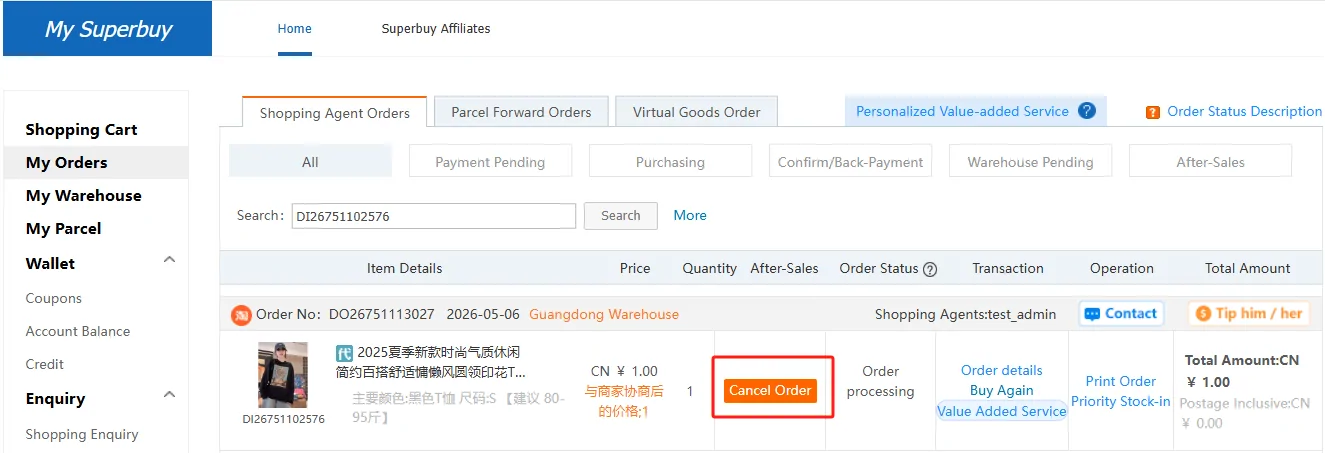
You want to cancel. The operator publishes how fast a cancellation is accepted and how fast the money comes back, by status:
| Order status | Application accepted | Refund completed |
|---|---|---|
| Payment Pending, Unprocessed, Verifying | accepted at once | refund at once |
| Processing | accepted within 24 hours | refund within 24 hours |
| Purchased | accepted within 72 hours | refund within 72 hours |
| Shipped, Signed, Arrived, Warehouse Stock-in | accepted within 48 hours | refund when the seller refunds, about 7 to 15 days |
| Purchased (Expert Sourcing) | accepted within 2 working days | whenever the seller refunds, about 7 to 15 days, and the item amount only: the 10% fee stays |
Refunds go to your Superbuy balance, at the exchange rate in force when you paid, which is why the rate matters even on an order you cancel. Second-hand orders and warehouse-sale items are not returnable; cancellations caused by out-of-stock or force majeure refund the service fee as well. help centre 1206, read 2026-10-10
Table
The same rules, as the operator tabulates them
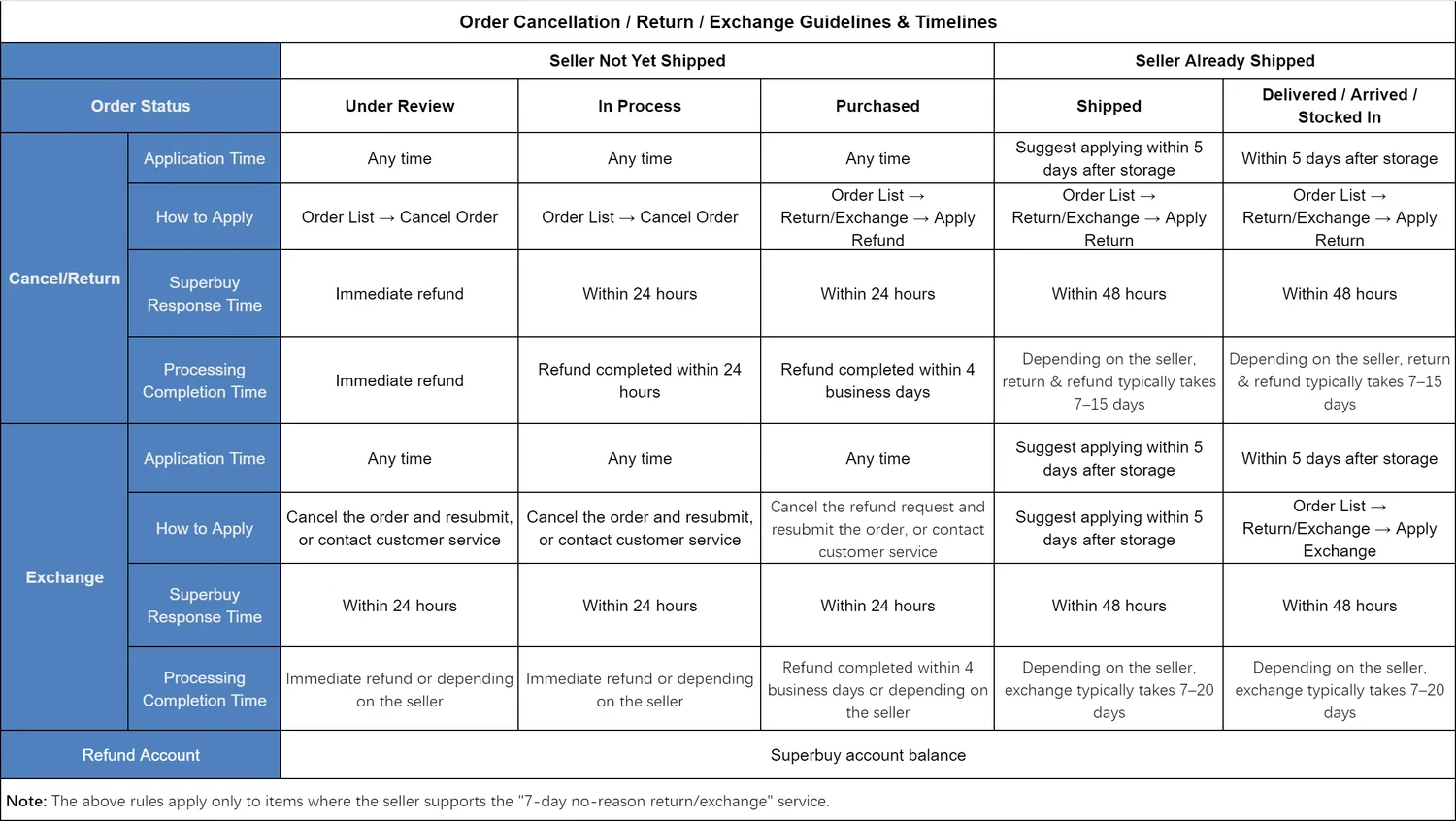
A second table, not the same one. The operator publishes this one split by whether the seller has shipped, with application time, how to apply, the buyer's response time and the processing time for cancel, return and exchange. Read the two together rather than picking one: where they disagree on an order already purchased, this one is the stricter. The note at the bottom says it applies to items whose seller supports seven-day no-reason returns, and many 1688 and Xianyu sellers do not. help centre 1419, read 2026-10-10
Returns
The no-reason return and exchange guarantee, with its ladder
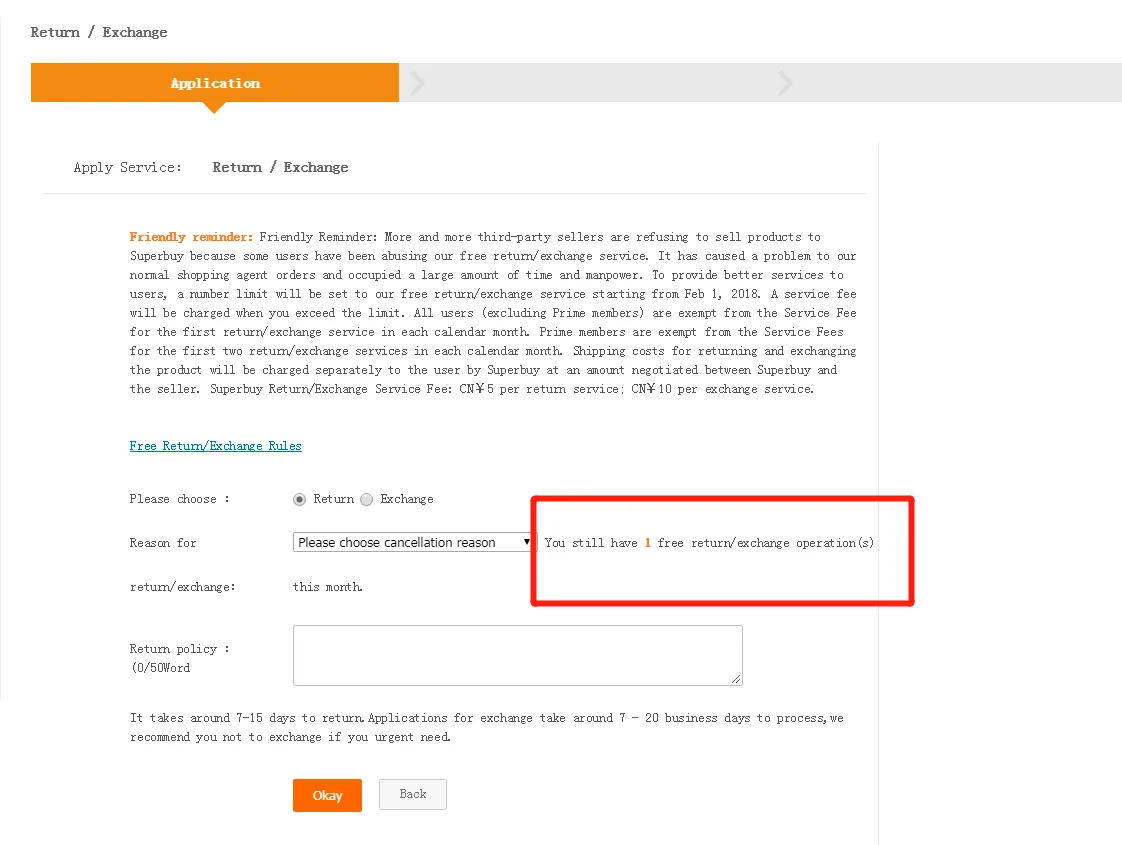
Within 5 days of the item being stored, or 7 days from the warehouse signing for it, you can ask for a no-reason return or exchange of a new, resellable item. The buyer answers within 48 hours, negotiates with the seller, and follows it through. The first operation each calendar month carries no operation fee; from the second the ladder applies, and you pay shipping both ways whenever nothing is wrong with the item. Returns complete in about 15 days after the parcel leaves the warehouse, exchanges in about 7 to 20 days. A missed 48-hour response pays ten times the operation fee into your balance, a rule that has run since 13 June 2025 and that excludes the Hong Kong warehouse. help centre 1442, 1441, read 2026-10-10
| Operations this month | Return | Exchange |
|---|---|---|
| 0 to 1 | CN¥0 | CN¥0 |
| 2 to 5 | CN¥5 | CN¥10 |
| 6 to 9 | CN¥10 | CN¥20 |
| 10 and above | CN¥20 | CN¥40 |
The request screen in the picture shows the free operations left this month on the order itself. The operator explains why a seller's shipping insurance often will not cover this: insurers price on return rate, its sourcing account has a high one, and a claim can be refused outright. That is why both legs are yours.
QC
QC photos: what the 24-hour step gives you, door by door
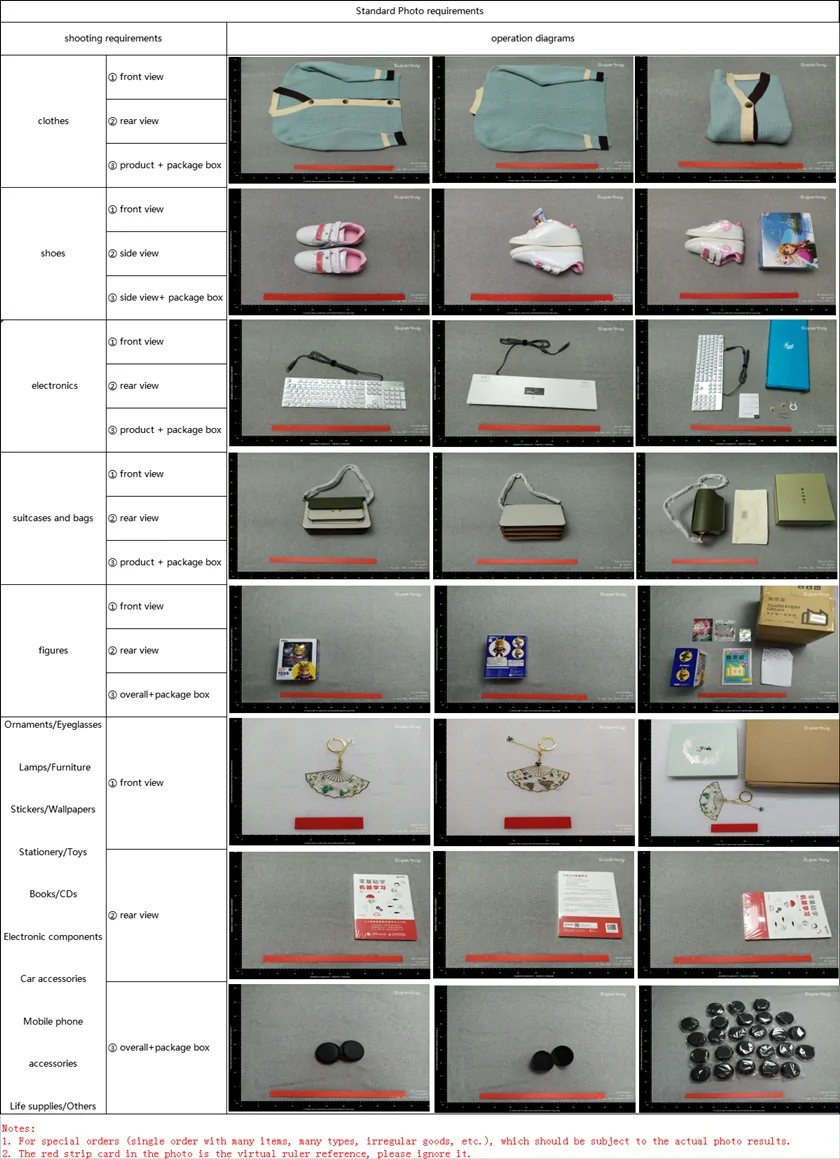
Every stored item gets a quality check within 24 hours of signing and three standard photos: front, back, and side or logo. The free scope verifies style, quantity, colour, size and model against the order and looks for damage. Worth knowing before you argue about a mark on arrival: the only place the operator attaches a number to a defect is section B of that article, which covers forwarding, where a circular defect over 0.5 cm or another shape over 1 cm counts. The shopping-agent section a few paragraphs above it publishes no threshold at all, so what counts as a defect on a purchased order is the inspector's call. Sealed goods stay sealed either way. Weidian and second-hand orders get three more detailed photos free; 1688 orders are counted by boxes and Class A listings sampled. help centre 1172, 1406, 3502, 1048, read 2026-10-10
A photo set takes about a minute to read properly. Compare the front shot to the card you ordered from, then the logo shot to the listing's own close-up, then the back shot for anything the listing did not show. A size tag is not measured in the free scope; if the number on it matters, a tape-measure photo is CN¥2, falling to half that from the third, and for CN¥30 the warehouse finds the nearest model it can to the measurements you supply and photographs the item worn, from four sides. Colour differences and measurement errors are listed by the operator as outside the free check, so they are not a reason for the warehouse to stop the order; they are a reason for the return window above. help centre 1112, 1393, 1172, read 2026-10-10
Stored
Stored in warehouse, and the 90 days
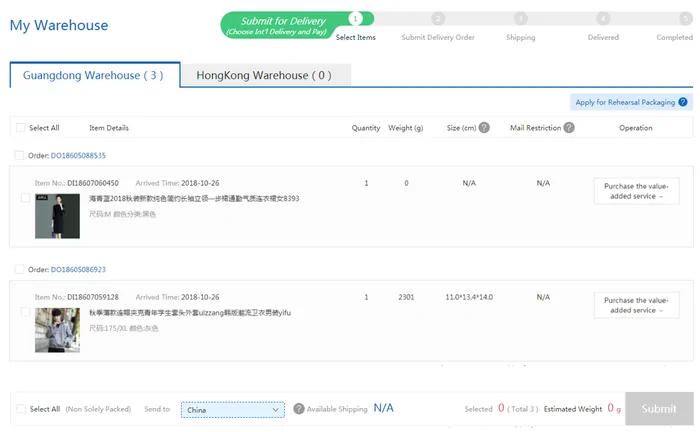
Stored in warehouse means the item is on a shelf and the free 90 days are counting; from day 91 to day 180 storage costs CN¥0.1 per item per day, and after 180 days without a shipping order the operator disposes of the item. My Warehouse, in the picture, lists stored items with weight and lets you select them for one parcel; what that parcel will cost is on the costs page, and if the warehouse has raised something with you, the escalation path is on the help page. Buying more and consolidating is free; the ten-kilogram mark is where customs begins to read a parcel as commercial. help centre 1439, 26, read 2026-10-10
From the warehouse to delivery
Once you accept the goods, select them in My Warehouse and submit a parcel. Compare route eligibility, billed weight, tracking and cover before paying the international shipping quote. Keep your return question open with support if the item is still disputed; do not dispatch it first.
Track from the parcel record and follow the carrier handover. If tracking stalls, quote the parcel number and last scan to support. At delivery, photograph visible damage and keep the outer packaging and label while reporting missing or damaged contents.